
MCP-Server auf Kubernetes mit kmcp und AgentGateway angehen
veröffentlicht am 19.12.2025 von Lucas Brüning
Verstehen Sie das Model Context Protocol, seine Verwendung, Funktionalität, wie man es sichert und warum es bald zu einem der grundlegenden Bausteine in einer KI-Agent-Architektur werden wird. Entdecken Sie verschiedene Möglichkeiten und Beispiele für die Einrichtung von MCP-Servern in Kubernetes mit AgentGateway, kgateway und kmcp. Erfahren Sie, wie Sie verschiedene MCP-Server unternehmensfähig machen, indem Sie sie mit Unternehmensfunktionen wie Authentifizierung, Autorisierung und Skalierbarkeit ausstatten.
Was ist das „Model Context Protocol” (MCP)?
LLMs finden in unserem Alltag zunehmend Verbreitung. LLMs sind gut darin, Texte und sogar Bilder zu generieren und vorherzusagen, aber es fehlt ihnen die Funktionalität, sich mit externen Systemen zu verbinden und diese zu verändern oder sie zum Abrufen von Informationen zu nutzen. Daher wurde das Model Context Protocol als Lösung entwickelt, um einen Standard für alle LLM-Anbieter zu schaffen, mit dem ihre LLMs mit externen Systemen verbunden werden können.
Das Model Context Protocol, oder MCP, ist ein Standard, der Ende 2024 von Anthropic entwickelt wurde. Mitte 2025 wurde es zunehmend von OpenAI und Google übernommen. Sein Ziel ist es, eine standardisierte Methode zu schaffen, mit der ein LLM in einer LLM-basierten Anwendung auf externe Systeme zugreifen kann. Dadurch kann Ihr LLM Funktionen und Prozeduren aufrufen (in der MCP-Spezifikation auch als „Tool-Aufrufe” bezeichnet) oder Informationen aus verschiedenen Datenquellen abrufen, die in der MCP-Spezifikation auch als „Ressourcen” bezeichnet werden. Obwohl Anthropic, OpenAI und andere Anbieter bereits eine Möglichkeit bieten, Tool-Aufrufe und das Abrufen von Ressourcen zu ermöglichen, bietet das MCP einen standardisierten Ansatz, der über verschiedene Anbieter und Frameworks in unterschiedlichen Anwendungen hinweg funktioniert.
Das MCP arbeitet in einer Client-Server-Architektur. Es umfasst in der Regel die folgenden Akteure:
- Host: Dies ist unsere KI-Anwendung, zum Beispiel ein Texteditor, ein Code-Editor oder jede andere Anwendung, die LLM-Technologien verwendet.
- LLM: Dies ist das LLM, das die Anwendung verwendet. Es kann sich um jedes beliebige LLM handeln, z. B. ChatGPT von OpenAI oder Claude von Anthropic oder sogar ein lokales LLM.
- MCP-Client: Der MCP-Client ist im Grunde genommen die „Leitung”, über die Ihr LLM, MCP-Server und Host miteinander kommunizieren. Er leitet Ihre LLM-Anfragen an das LLM weiter, und das LLM ruft die Tool-Aufrufe über den MCP-Client auf.
- MCP-Server: Der Server enthält alle Tools und Ressourcendefinitionen sowie die tatsächliche Implementierung und den Code der verschiedenen Tools. Die Logik zum Abrufen von Ressourcen ist ebenfalls hier enthalten.
In der folgenden Grafik finden Sie einen Standard-MCP-Ablauf, bei dem das LLM ein bestimmtes Tool eines MCP-Servers verwendet, um die Aufgabe zu erfüllen. In diesem Fall gehen wir davon aus, dass der Host und der Client Teil derselben Anwendung sind. Es ist jedoch auch möglich, dass der Client und der Host vollständig voneinander getrennt sind.
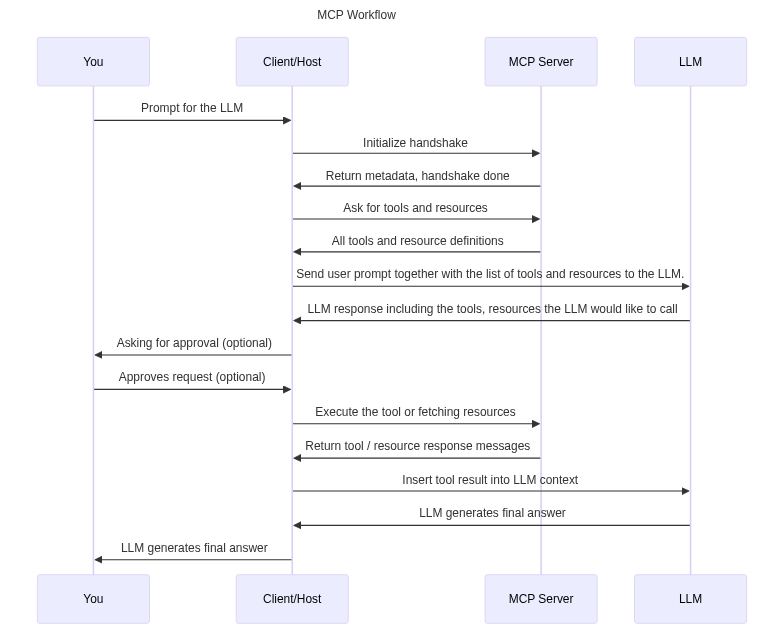
Wie Sie hier sehen können, führt das LLM das Tool nicht direkt aus, da LLMs nur in der Lage sind, Text und Grafiken zu generieren. Sie generieren vielmehr einen Text an den Client, in dem sie mitteilen, dass das LLM ein Tool mit bestimmten Parametern aufrufen möchte, und nach der Zustimmung des Benutzers ruft der Client den MCP-Server auf, um den eigentlichen Tool-Code auszuführen. Die Kommunikation zwischen allen Akteuren in der MCP-Spezifikation erfolgt über JSON-RPC, während MCP-Server über die Standardeingabe und -ausgabe oder über Streamable HTTP kommunizieren können.
AgentGateway
Im Wesentlichen sind MCP-Server Software, die in einem Container ausgeführt werden kann, was sich hervorragend für Workflows in Kubernetes oder containerisierte Workflows im Allgemeinen eignet. Dies gilt jedoch möglicherweise nicht für alle MCP-Server. In Kubernetes-Workflows muss ein Pod eine API offenlegen oder eine Art Netzwerkzugänglichkeit bereitstellen, um sie über einen Dienst, einen Ingress oder ein Gateway offenlegen zu können. Bei einigen MCP-Servern ist dies möglicherweise nicht direkt möglich, da sie nur über Standardeingabe und Standardausgabe kommunizieren können, die nicht zur Bereitstellung von Netzwerkzugänglichkeit verwendet werden können. Da es sich bei MCP um eine relativ neue und aufstrebende Technologie handelt, implementiert möglicherweise nicht jeder MCP-Server wichtige Unternehmensfunktionen wie Authentifizierung, Autorisierung und Beobachtbarkeit. Die Verwendung einer großen Anzahl verschiedener MCP-Server kann auch die Herausforderung mit sich bringen, eine große Anzahl von Servern mit unterschiedlichen Endpunkten in Ihrer Host-Anwendung zu verwalten.
Diese Probleme können mit einem sogenannten „MCP-Gateway” wie „AgentGateway” gelöst werden. Dabei handelt es sich um ein Open-Source-Gateway, das für KI-Agenten und MCP-Server entwickelt wurde. Sie können es verwenden, um Ihre MCP-Server um Beobachtungs- und Sicherheitsmechanismen zu erweitern, um Tool- und Ressourceninteraktionen und -aufrufe zu beobachten oder um Ihre MCP-Server mit OAuth2 zu schützen. Es kann auch eine Netzwerk-Transportschicht für Ihre stdio MCP-Server bereitstellen, sodass diese über Streamable HTTP kommunizieren und auch auf Kubernetes ordnungsgemäß ausgeführt werden können. Darüber hinaus unterstützt es den Betrieb von LLMs und die Verwendung des Agent-to-Agent-Protokolls (A2A), aber diese Funktionen werden in diesem Blog nicht behandelt.
Um AgentGateway auf Kubernetes einzurichten, müssen Sie kgateway verwenden, eine Implementierung der Kubernetes-Gateway-API. Diese kann dann verwendet werden, um Ihre MCP-Server auf Kubernetes verfügbar zu machen und zu betreiben.
Zunächst benötigen Sie eine Art Pod oder Deployment und einen Dienst für den MCP-Server, damit dieser über das Netzwerk erreichbar ist. Anschließend müssen Sie mit kgateway ein sogenanntes „Backend” vom Typ MCP erstellen. In den Beispielen werden kgateway in Version 2.2.0 und AgentGateway in Version 0.10.5 verwendet:
apiVersion: gateway.kgateway.dev/v1alpha1
kind: Backend
metadata:
  name: mcp-backend
spec:
  type: MCP
  mcp:
    name: mcp-server
    targets:
    - static:
        name: the-mcp-server
        host: mcp-service.default.svc.cluster.local
        port: 12001
        protocol: StreamableHTTP
Dieses Beispiel verwendet ein sogenanntes „statisches” MCP-Backend, bei dem Sie den genauen Hostnamen des Dienstes angeben müssen. Kgateway unterstützt auch „dynamische” MCP-Backends, bei denen die Backend-Ressource über Label-Selektoren mit dem Dienst verbunden ist.
Als Nächstes müssen Sie eine HTTP-Route erstellen, eine native Ressource der Kubernetes Gateway API, die auf unser gerade erstelltes Backend verweist:
apiVersion: gateway.networking.k8s.io/v1
kind: HTTPRoute
metadata:
  name: mcp
spec:
  parentRefs:
  - name: agentgateway
  rules:
    - backendRefs:
      - name: mcp-backend
        group: gateway.kgateway.dev
        kind: Backend
Zuletzt müssen Sie die Gateway-Ressource erstellen. In einer Cloud-Umgebung wird ein Cloud-Load-Balancer erstellt, der dann Ihr Gateway verfügbar macht.
apiVersion: gateway.networking.k8s.io/v1
kind: Gateway
metadata:
  name: agentgateway
spec:
  gatewayClassName: agentgateway
  listeners:
  - protocol: HTTP
    port: 8080
    name: http
    allowedRoutes:
      namespaces:
        from: All
Jetzt sollte Ihr MCP-Server über Port 8080 erreichbar sein. Sie können den Endpunkt /mcp verwenden, um Ihre Agenten über Streamable HTTP zu verbinden.
Ein derzeitiger Nachteil ist, dass die AgentGateway-Konfiguration mit kgateway nicht alle Funktionen unterstützt, wie z. B. das Umschließen von stdio-Servern oder die korrekte Einrichtung der MCP-Authentifizierung. Dies wird sich höchstwahrscheinlich in zukünftigen Versionen von kgateway ändern. Außerdem wird die Bereitstellung mit der Ingress-API nicht unterstützt. Um diese wichtigen Funktionen in Kubernetes nutzen zu können, werden wir uns ein Tool namens kmcp ansehen.
kMCP
Kmcp ist ein CLI-Tool, das für die Entwicklung benutzerdefinierter MCP-Server mit Go oder Python verwendet werden kann. Es kann aber auch zum Bereitstellen und Einrichten von MCP-Servern auf Kubernetes verwendet werden. Es ist möglich, Ihren entwickelten MCP-Server bereitzustellen, indem Sie ein Container-Image erstellen und es mit einem Befehl direkt auf Kubernetes bereitstellen. Bei der Bereitstellung der MCP-Server mit kmcp wird im Hintergrund AgentGateway verwendet, wodurch wir mehr seiner Funktionen nutzen können. Mit kmcps CRDs können wir ganz einfach stdio MCP-Server einrichten. Kmcp erstellt dann einen Kubernetes-Dienst und eine Bereitstellung für uns. Ein Beispiel hierfür wäre der offizielle GitHub MCP-Server. Obwohl es auch eine gehostete Version gibt, möchten Sie es manchmal selbst auf Ihrem Kubernetes-Cluster hosten:
apiVersion: kagent.dev/v1alpha1
kind: MCPServer
metadata:
  name: github-stdio-mcp
spec:
  deployment:
    image: "ghcr.io/github/github-mcp-server:latest"
    port: 12001
    cmd: "/server/github-mcp-server"
    args: ["stdio"]
    secretRefs:
        - name: github-token
  transportType: "stdio"
Wir verwenden hier kmcp mit der Version 0.1.9.
Beachten Sie bei diesem speziellen Beispiel, dass der GitHub MCP-Server ein Token benötigt, das Sie als Kubernetes-Secret bereitstellen müssen. Geben Sie den Namen Ihres Secrets in das Feld „secretRefs” ein. Der erstellte Dienst kann dann in Kombination mit einem Ingress verwendet werden, um den MCP-Server verfügbar zu machen. Andererseits können Sie auch wieder kgateway zusammen mit AgentGateway verwenden und diese mit kmcp kombinieren. Wie im AgentGateway-Beispiel angegeben, können Sie die interne Service-URL verwenden, um den MCP-Server mit kgateway freizugeben.
MCP-Authentifizierung mit OAuth2
In einem Unternehmenskontext möchten Sie Ihre MCP-Server möglicherweise nicht ohne Authentifizierung und Autorisierung öffentlich zugänglich machen. Das Protokoll ermöglicht es Ihnen, Ihre MCP-Server zu schützen und sich über OAuth2 gegenüber ihnen zu authentifizieren. Dadurch können Ihre MCP-Server und sogar Ihre MCP-Tools und -Ressourcen mit RBAC gesteuert werden. AgentGateway macht es recht einfach, einen MCP-Server mit OAuth2 einzurichten, auch wenn dies vom MCP-Server nicht nativ unterstützt wird. Dazu benötigen Sie einen Identitätsanbieter. In unseren Beispielen verwenden wir Keycloak. OAuth2 wird derzeit in AgentGateway nicht nativ unterstützt, wenn es in Kombination mit kgateway verwendet wird. Es ist möglich, eine rohe AgentGateway-Konfiguration mit kgateway bereitzustellen, was jedoch eine undokumentierte und experimentelle Funktion ist. Wir vereinfachen den Prozess hier, indem wir AgentGateway als eigenständige Lösung verwenden. Nehmen wir an, wir haben Keycloak ordnungsgemäß eingerichtet und konfiguriert und verschiedene Benutzer sowie einen Bereich für unsere MCP-Authentifizierung erstellt. Mit einem MCP-Server, der beispielsweise mit kmcp eingerichtet wurde, könnte unsere AgentGateway-Konfiguration wie folgt aussehen:
binds:
- port: 8080
  listeners:
  - routes:
      - backends:
          - mcp:
              targets:
              - name: mcp
                mcp:
                  host: http://localhost:8081/mcp/
        matches:
          - path:
              exact: /github/mcp
          - path:
              exact: /.well-known/oauth-protected-resource/github/mcp
          - path:
              exact: /.well-known/oauth-authorization-server/github/mcp
          - path:
              exact: /.well-known/oauth-authorization-server/github/mcp/client-registration
        name: mcp-github
        policies:
          cors:
            allowHeaders:
            - "*"
            allowOrigins:
            - "*"
          mcpAuthentication:
            issuer: http://keycloak.192.168.49.2.nip.io/realms/mcp
            jwksUrl: http://keycloak.192.168.49.2.nip.io/realms/mcp/protocol/openid-connect/certs
            audience: mcp_proxy
            provider:
              keycloak: {}
            resourceMetadata:
              resource: http://localhost:8080/github/mcp
              scopesSupported:
              - profile
              - offline_access
              - openid
              - email
              - roles
              bearerMethodsSupported:
              - header
              - body
              resourceDocumentation: http://localhost:8080/github/mcp/docs
          mcpAuthorization:
            rules:
            # Allow anyone to call “get_me”
            - 'mcp.tool.name == "get_me"'
            # Only the admin user can call “delete_repository”
            - 'jwt.sub = "admin" && mcp.tool.name == "delete_repository"'
Dieses Beispiel umschließt die AgentGateway-Authentifizierungskonfiguration um unseren GitHub MCP-Server, der von unserem Cluster aus erreichbar ist. In der Konfiguration können Sie die für die Authentifizierung erforderlichen Keycloak-URLs definieren. Dort können Sie auch Regeln für die Autorisierung mithilfe der „Common Expression Language” (CEL) erstellen. Damit können Sie bestimmte Tools so einschränken, dass sie nur von bestimmten Benutzern oder bestimmten Gruppen aufgerufen werden können.
Wenn Ihr MCP-Client versucht, eine Verbindung zum MCP-Server herzustellen, öffnet sich ein Anmeldeformular, in dem Sie sich mit Ihren konfigurierten Benutzeranmeldedaten anmelden können. Beachten Sie, dass Ihr MCP-Client den OAuth2-Flow für MCP unterstützen muss.
Dieses Beispiel zeigt einen wichtigen Teil der MCP-Authentifizierung. Der zweite Teil umfasst die Authentifizierung gegenüber Drittanbieterdiensten. Am häufigsten wird dies mit API-Schlüsseln durchgeführt, die bei der Einrichtung des MCP-Servers konfiguriert werden. Dies ist jedoch möglicherweise kein geeigneter Ansatz für Anwendungsfälle, die einen Ansatz erfordern, der unterschiedliche Benutzerberechtigungen und Mandantenfähigkeit berücksichtigt. Im Idealfall würde der MCP-Server die Anmeldedaten der Benutzer zur Authentifizierung bei Drittanbieterdiensten verwenden und die Berechtigungen der Benutzer zum Abrufen von Daten und Aufrufen von Tools nutzen. Dies ist ein bekanntes Problem und ein aktuelles Thema im Protokoll. Auf hoher Ebene wird dies über eine MCP-Funktion namens „Elicitation” (Ermittlung) erfolgen. Dadurch kann der MCP-Server zusätzliche Benutzereingaben oder Informationen von unserem MCP-Client anfordern. In unserem Fall könnte dies für benutzergenerierte API-Schlüssel oder Token verwendet werden. Es gibt sogar eine laufende Diskussion über URL-Modus-Elicitation, die die Sicherheit dieses Workflows weiter erhöht. Die Elicitation-Funktion ist ebenfalls recht neu, was bedeutet, dass die meisten MCP-Clients sie noch nicht unterstützen, aber die Akzeptanz wächst.
Es gibt auch andere MCP-Gateways, die versuchen, dieses Problem zu lösen. LiteLLM, eine Software, die in einem anderen Blog-Artikel vorgestellt wurde, wurde aktualisiert, um MCP-Server zu unterstützen und sie mit verschiedenen Authentifizierungsmechanismen zu verbessern.
Zusammenfassung
Das Model Context Protocol (MCP) entwickelt sich rasch zu einer grundlegenden Technologie für die standardisierte und anbieterunabhängige Integration großer Sprachmodelle in externe Systeme. Während MCP-Server natürlich gut für containerisierte Umgebungen geeignet sind, bringt ihr Hosting in Kubernetes Überlegungen hinsichtlich Netzwerk, Sicherheit und betrieblicher Komplexität mit sich, insbesondere bei der Verwendung von stdio-basierten Servern oder Bereitstellungen, denen Unternehmensfunktionen wie Authentifizierung, Autorisierung und Beobachtbarkeit fehlen. Lösungen wie AgentGateway, kgateway, LiteLLM und kmcp schließen diese Lücken, indem sie robuste Transportschichten, OAuth2-basierten Schutz, RBAC-Funktionen und vereinfachte Bereitstellungsworkflows hinzufügen. Zusammen ermöglichen sie die Ausführung sowohl nativer MCP-Server als auch rein stdio-basierter Implementierungen in Kubernetes-Umgebungen der Produktionsklasse.
Da sich das MCP-Ökosystem weiterentwickelt, werden kommende Funktionen wie die URL-Modus-Ermittlung die sichere, mandantenfähige und benutzerbewusste Integration weiter stärken. Mit zunehmender Reife der Tools, MCP-Clients, Gateways und des Protokolls werden sie zu einem zentralen Baustein für AI-Agentenarchitekturen auf Unternehmensebene. Das Hosting von MCP-Servern auf Kubernetes, unterstützt durch diese neuen Tools und Standards, bietet eine skalierbare, sichere und zukunftssichere Grundlage für die Entwicklung von LLM-basierten Anwendungen.
Further readings
- https://liquidreply.net/news/manage-a-unified-llm-api-platform-with-litellm
- https://github.com/modelcontextprotocol/modelcontextprotocol/pull/887
- https://kgateway.dev/docs/agentgateway/latest/
- https://www.keycloak.org/documentation
- https://www.anthropic.com/news/model-context-protocol
- https://kagent.dev/docs/kmcp