
Kubernetes GPU Entitlements with DRA and vCluster
veröffentlicht am 30.06.2026 von Jannis Schoormann
Sharing GPUs between tenants can be challenging when different teams have different entitlements. This guide demonstrates how to use a combination of Kubernetes DRA and vCluster to provide one tenant with access to dedicated A100 capacity and another with access to a MIG slice, while ensuring that each tenant can only see the GPU classes they are permitted to use.
GPU sharing in Kubernetes is easy until tenants have different hardware entitlements. One team may require exclusive A100 capacity, while another only needs a small MIG slice. The hard part is not just scheduling those devices, but making sure each tenant only sees and requests the GPU classes it is allowed to use.
This post walks through one answer end to end. Dynamic Resource Allocation (DRA) provides the GPU allocation model, and vCluster's selector-based sync gives each tenant a filtered view of the GPU catalogue. By the end you'll have a GKE cluster running two tenant virtual clusters: legal-ai with access to a whole-GPU class, and research-ai with access to a MIG-slice class. Each tenant sees only its own GPU entitlement.
Everything below is reproducible from an empty GCP project. The demo files live at github.com/Liquid-Reply/vCluster-Demo.
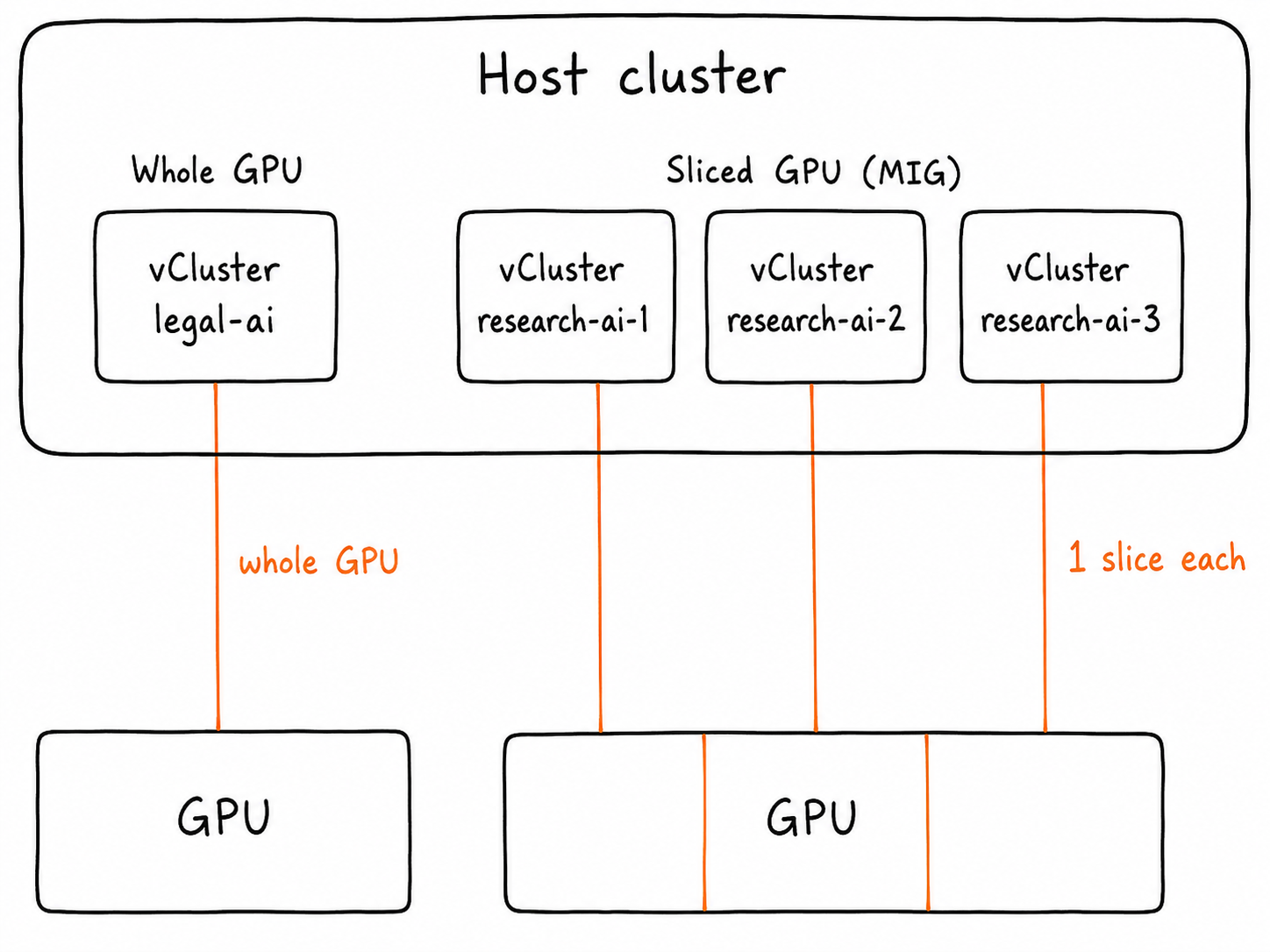
At a high level, resources on a virtual cluster can consume a GPU in two ways. One tenant takes a whole card, or several tenants each take a hardware slice of a single card. Both models run side by side on the same host. The same physical GPU capacity can be carved into tenant-specific entitlements, so multiple tenants can safely share GPU infrastructure without seeing or requesting each other’s allocation classes.
Who this is for
This is for platform engineers running multi-tenant GPU clusters, where tenants hold different entitlements and shouldn't see each other's hardware. Picture a regulated enterprise with separate teams (legal, research, a hosted-LLM product) sharing one set of infrastructure.
You'll want to be comfortable with Kubernetes and the basics of GPU scheduling. Prior experience with DRA or vCluster isn't required.
The building blocks
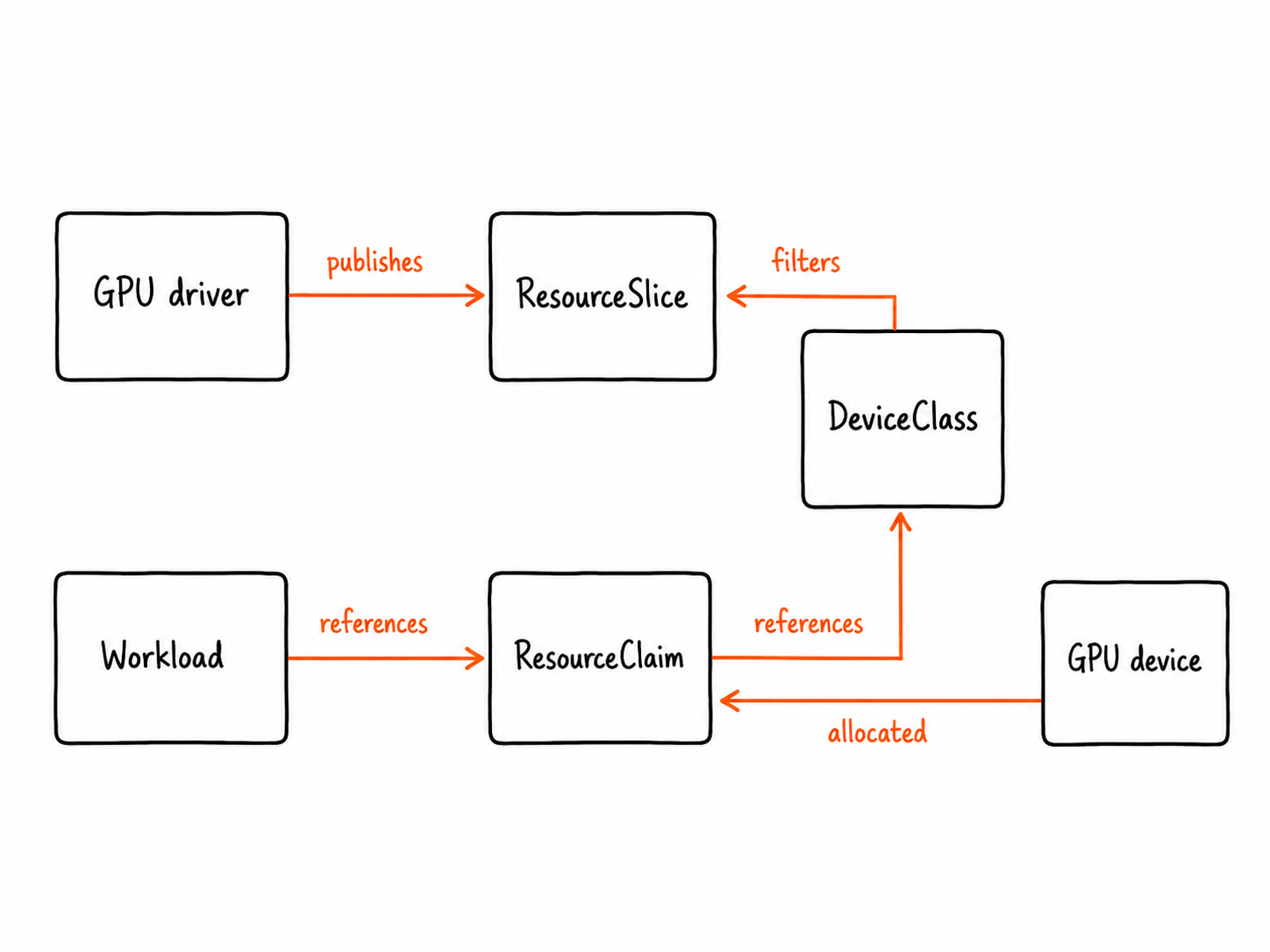
DRA (Dynamic Resource Allocation) is the structured replacement for the device-plugin model. The GPU driver publishes ResourceSlice objects that describe the real devices and their attributes. The platform team defines DeviceClass objects, which are named, selector-based views over those devices. A workload then requests hardware through a ResourceClaim that references a DeviceClass by name, and DRA allocates a matching device. DRA went GA in Kubernetes 1.34 under resource.k8s.io/v1, the API version used throughout this post.
The key thing to hold onto: a DeviceClass is just a labeled, selectable object. That's what makes it the hinge of this whole setup, because anything that can filter on labels can decide which classes a tenant gets to see. Keep that in mind when vCluster shows up in a moment.
The diagram below shows how these objects relate. The DeviceClass sits in the middle, defined by the platform team and referenced by every workload claim:
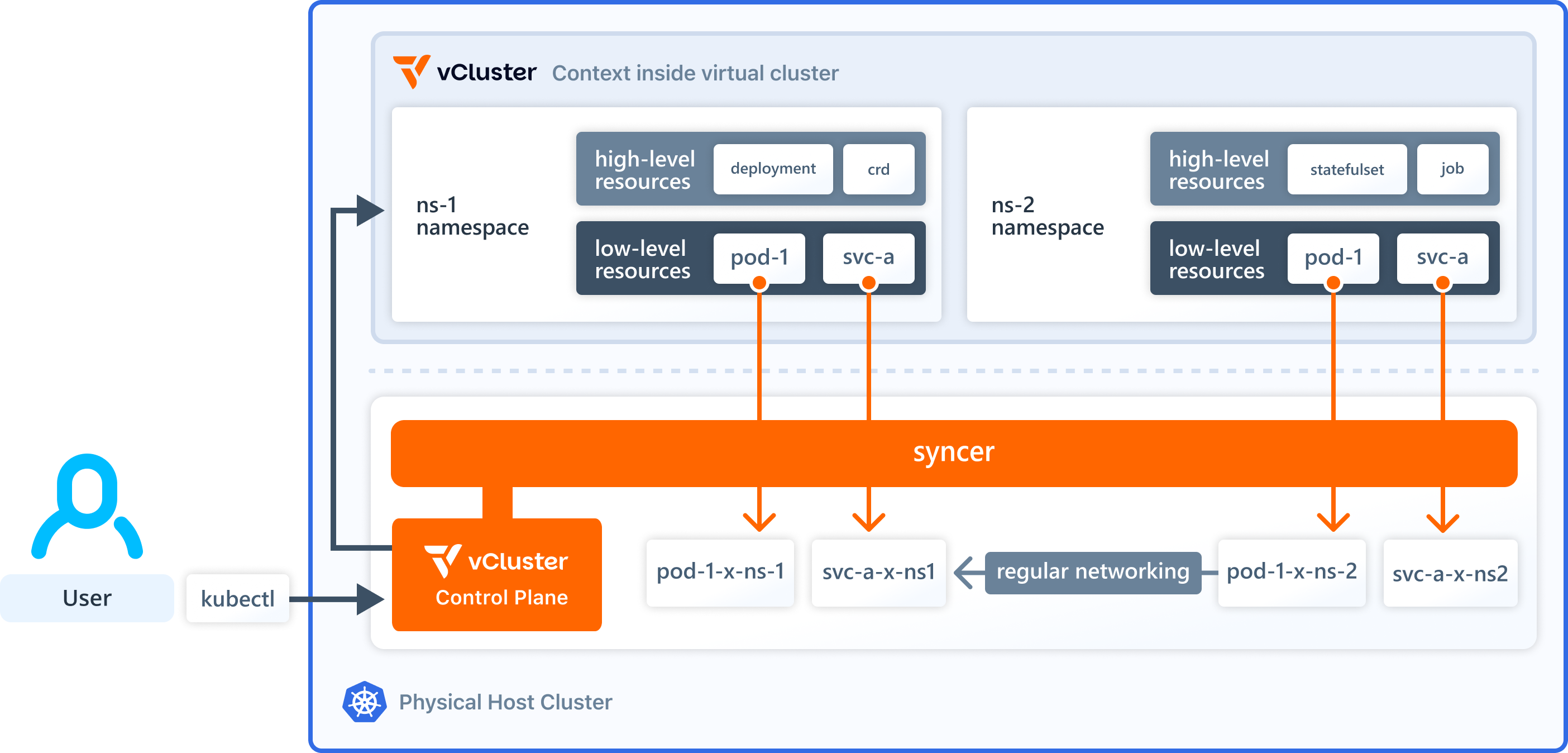
vCluster runs a genuine Kubernetes control plane within a host cluster's namespace. Each tenant has their own API server, CRDs and RBAC, while sharing the host's nodes. As it is a genuine control plane and not just a labelled namespace, the isolation is structural: a tenant simply has no API access to objects that have not been synced to them.
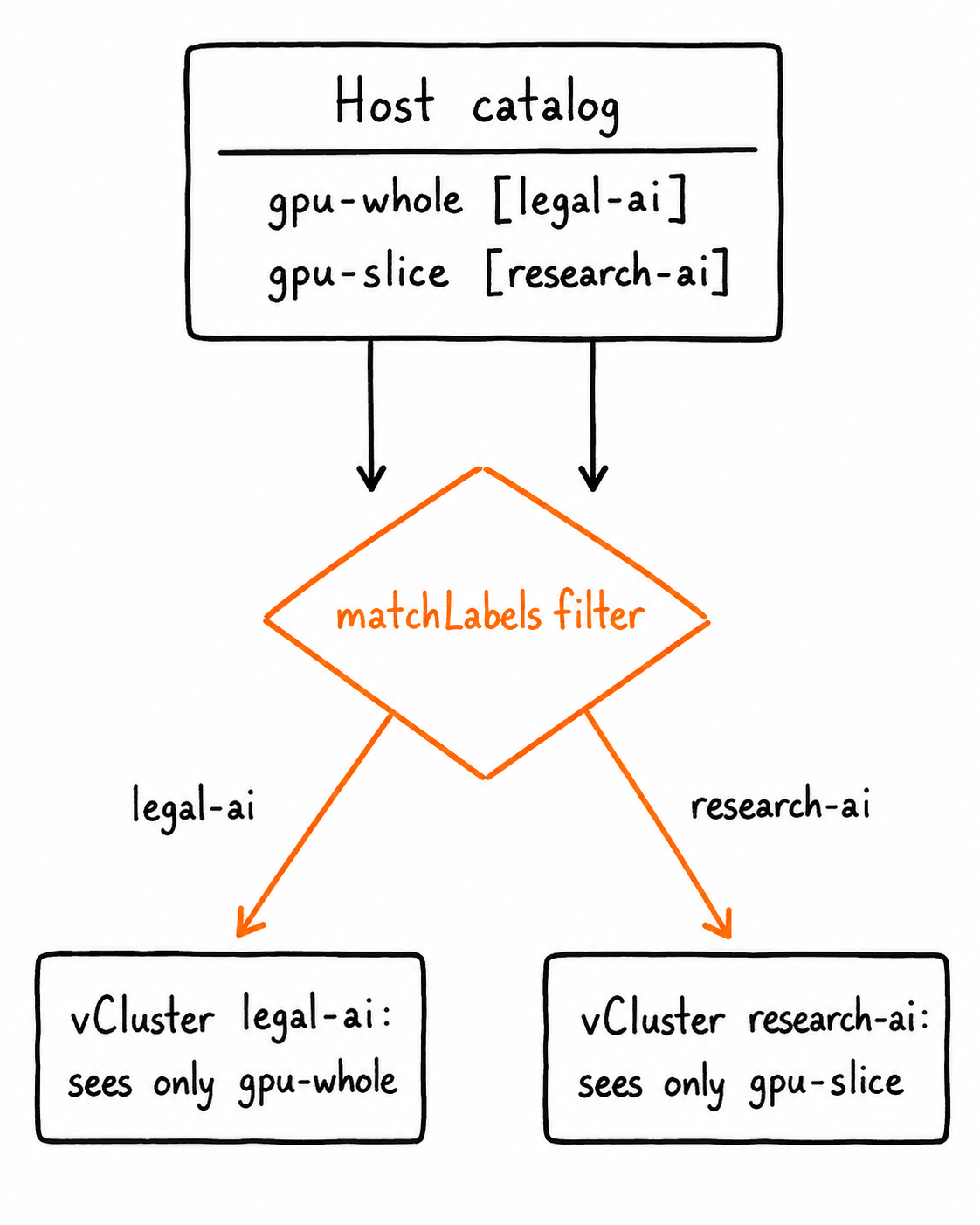
That sync is the other half of the story. The bidirectional sync layer determines which resources flow between the virtual cluster and the host, and this can be filtered by label selector. Remember that DeviceClass is a labelled object. This is what the filter uses. The host catalogue flows down to each tenant, but only the classes whose labels match that tenant are included. This single filter turns one shared GPU catalogue into a per-tenant view.
Requirement: DRA Sync is a vCluster Platform feature. It's available starting from the vCluster Free tier. Without it, the syncer crashes on startup with
you are trying to use a vCluster pro feature 'DRA Sync'.
Why not just Namespaces?
A namespace is a fine boundary for namespaced objects: Pods, Services, most application resources. But the GPU catalogue in this demo isn't namespaced workload state. DRA introduces cluster-scoped objects like DeviceClass and ResourceSlice, and those describe the shared hardware inventory of the whole host cluster.
With plain namespaces, every tenant is still talking to the same API server. You can lean on RBAC and admission policy to restrict what they list or create, but you're building all of that around one shared control plane and one shared set of cluster-scoped resources. That puts you in an awkward spot. If tenants are allowed to discover DeviceClass objects, they see more of the GPU catalogue than they should. If they're not, the self-service experience falls apart. And since a ResourceClaim references a DeviceClass by name, you need yet more admission controls just to stop a tenant requesting a class outside their entitlement. Every guarantee becomes a policy you have to write, and keep correct, forever.
vCluster changes the shape of the problem. Each tenant gets its own API server, RBAC, CRDs, and object view. The host platform team keeps ownership of the real GPU catalogue, and vCluster syncs only the allowed DeviceClass objects into each tenant cluster. From the tenant's side, an unauthorized GPU class doesn't fail authorization. It isn't there at all.
That's the reason vCluster earns its place here. Not because namespaces are useless, but because this pattern needs per-tenant API visibility for cluster-scoped resources, and a namespace can't give you that.
The architecture
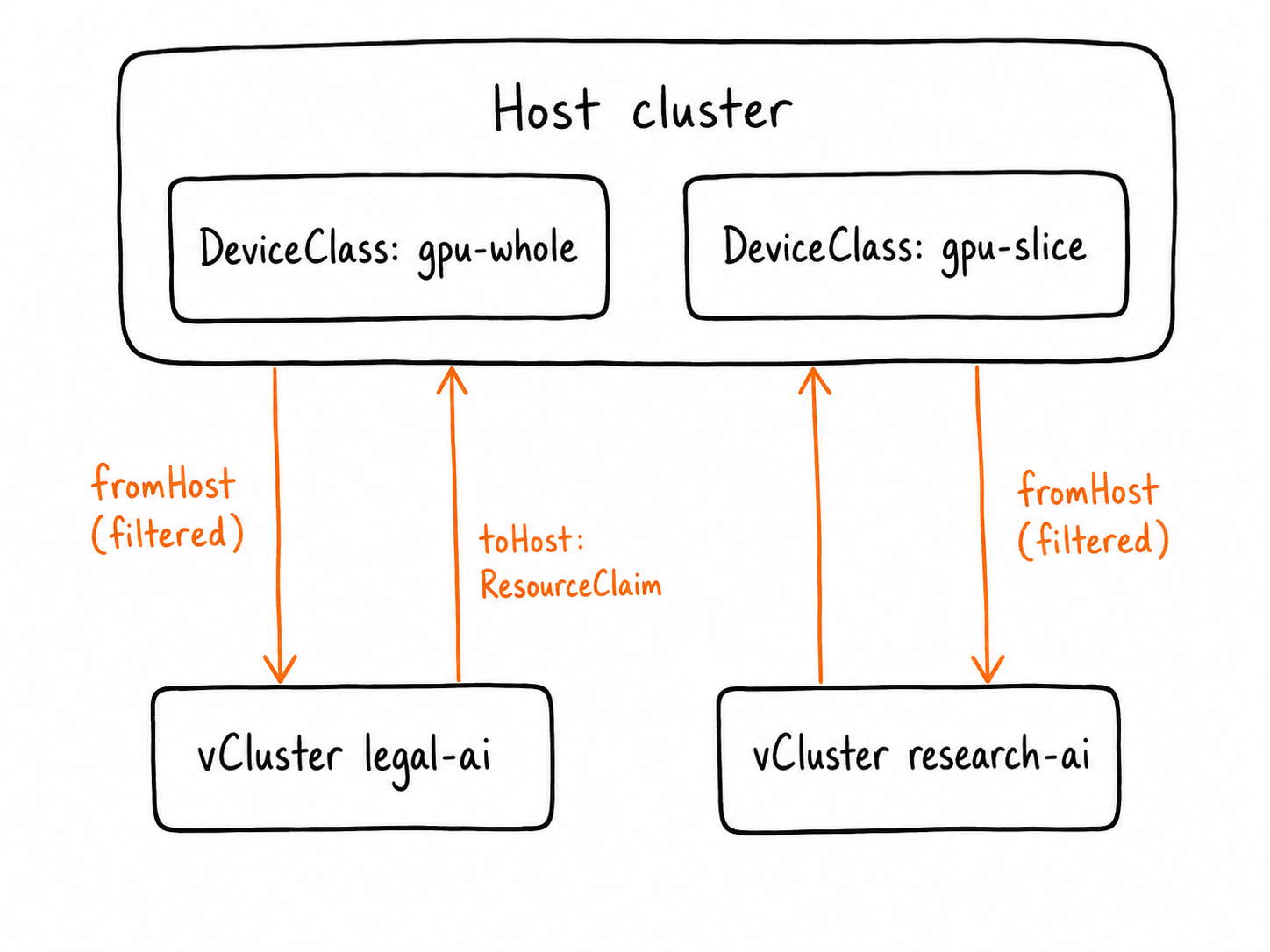
The host platform team owns the DeviceClass objects. vCluster syncs only the matching class into each tenant, and syncs tenant-created ResourceClaim objects back down to the host for allocation.
One important detail: the whole-GPU and MIG-slice capacity in this demo come from different GPU node pools. A single A100 is not simultaneously exposed as both a full GPU and as MIG slices. The point of the demo is that one shared Kubernetes platform can expose both allocation models side by side: exclusive whole-GPU capacity for one tenant, and MIG-backed slice capacity for another. The sliced path is shown with a single tenant here, but the pattern can be extended by adding more vClusters and mapping each of them to its own MIG-backed slice entitlement when multiple tenants should share one physical GPU.
What you'll need
| Tool | Minimum version |
|---|---|
gcloud CLI | v400+ |
kubectl | matching a 1.34+ cluster (DRA GA) |
| Helm | v3.12+ |
| vCluster CLI | v0.35+ |
Step 0 — Clone the repo and set your environment
git clone https://github.com/Liquid-Reply/vCluster-Demo.git
cd vCluster-Demo

export PROJECT_ID=your-gcp-project-id
export CLUSTER=dra-gpu-sync-demo
export PLAT_NS=vcluster-platform
export GPU_TYPE=nvidia-tesla-a100
export GPU_MACHINE_TYPE=a2-highgpu-1g
export MIG_PROFILE=1g.5gb
export WHOLE_GPU_NODEPOOL=a100-whole-pool
export SLICE_GPU_NODEPOOL=a100-mig-1g5gb-pool

gcloud config set project $PROJECT_ID
A100 isn't offered in every zone, and a regional cluster can't pull GPU node pools from a zone it doesn't span. So pick a zone first, then match the region to it:
gcloud compute accelerator-types list \
  --filter="name=($GPU_TYPE)" \
  --format="table(name,zone)"
Pick a zone from the output and set both GPU_ZONE and its parent LOCATION. For example, if europe-west4-a shows up:
export GPU_ZONE=europe-west4-a
export LOCATION=europe-west4
Don't create the cluster until both are set correctly.
Step 1 — Enable APIs and create the GKE cluster
gcloud services enable \
  container.googleapis.com compute.googleapis.com iam.googleapis.com \
  cloudresourcemanager.googleapis.com serviceusage.googleapis.com

gcloud container clusters create $CLUSTER \
  --location=$LOCATION \
  --machine-type=e2-standard-4 \
  --num-nodes=1 \
  --release-channel=regular \
  --enable-ip-alias

gcloud container clusters get-credentials $CLUSTER --location=$LOCATION

kubectl create clusterrolebinding cluster-admin-binding \
  --clusterrole=cluster-admin \
  --user=<YOUR_EMAIL>

kubectl get nodes
Step 2 — Install vCluster Platform
Platform must be up before you create any tenant vClusters.
vcluster platform start
This deploys Platform and opens its config UI. Wait for all pods to reach Running:
kubectl get pods -n $PLAT_NS
Confirm the CLI is logged in and can see the default project. And one thing to remember: the install has to be licensed for DRA Sync, or the syncer will crash later.
vcluster platform list projects # expect: default
Step 3 — Add GPU nodes and the DRA driver
Two small node pools: one whole A100 for legal, one A100 split into 1g.5gb MIG slices for research. Both scale to zero and carry a GPU taint.
# Whole-GPU pool
gcloud container node-pools create $WHOLE_GPU_NODEPOOL \
  --cluster=$CLUSTER --location=$LOCATION --node-locations=$GPU_ZONE \
  --machine-type=$GPU_MACHINE_TYPE \
  --accelerator=type=$GPU_TYPE,count=1,gpu-driver-version=latest \
  --num-nodes=1 --image-type=COS_CONTAINERD \
  --enable-autoscaling --min-nodes=0 --max-nodes=1 \
  --node-taints=nvidia.com/gpu=present:NoSchedule

# MIG-sliced pool (one A100 -> seven 1g.5gb slices)
gcloud container node-pools create $SLICE_GPU_NODEPOOL \
  --cluster=$CLUSTER --location=$LOCATION --node-locations=$GPU_ZONE \
  --machine-type=$GPU_MACHINE_TYPE \
  --accelerator=type=$GPU_TYPE,count=1,gpu-partition-size=$MIG_PROFILE,gpu-driver-version=latest \
  --num-nodes=1 --image-type=COS_CONTAINERD \
  --enable-autoscaling --min-nodes=0 --max-nodes=1 \
  --node-taints=nvidia.com/gpu=present:NoSchedule
Wait for the GPU nodes to join (kubectl get nodes -w), then install the NVIDIA DRA driver. On GKE you must point it at the GKE-managed driver path:
helm install dra-driver-nvidia-gpu \
  oci://registry.k8s.io/dra-driver-nvidia/charts/dra-driver-nvidia-gpu \
  --version 0.4.0 \
  --namespace dra-driver-nvidia-gpu --create-namespace \
  --set gpuResourcesEnabledOverride=true \
  --set resources.computeDomains.enabled=false \
  --set nvidiaDriverRoot=/home/kubernetes/bin/nvidia
Verify the driver registered its classes and is publishing device slices:
kubectl get pods -n dra-driver-nvidia-gpu
kubectl get deviceclasses          # expect gpu.nvidia.com, mig.nvidia.com, ...
kubectl get resourceslices -o wide # expect slices for both drivers
The classic NVIDIA device plugin exposes
nvidia.com/gpuand is not the same as DRA. The whole demo depends on the DRA driver above.
Step 4 — The platform team defines the tenant GPU classes
These live on the host cluster only. Each carries a tenant label and a CEL selector pinning it to a driver (and, for the slice, a MIG profile):
apiVersion: resource.k8s.io/v1
kind: DeviceClass
metadata:
  name: gpu-slice
  labels:
    gpu.platform/tenant: research-ai
    gpu.platform/allocation: slice
    kubernetes.io/device.class: nvidia
spec:
  selectors:
    - cel:
        expression: "device.driver == 'mig.nvidia.com' && device.attributes['gpu.nvidia.com'].profile == '1g.5gb'"
---
apiVersion: resource.k8s.io/v1
kind: DeviceClass
metadata:
  name: gpu-whole
  labels:
    gpu.platform/tenant: legal-ai
    gpu.platform/allocation: whole
    kubernetes.io/device.class: nvidia
spec:
  selectors:
    - cel:
        expression: "device.driver == 'gpu.nvidia.com'"
kubectl apply -f dra-gpu-sync/gpu-deviceclasses.yaml
kubectl get deviceclasses --show-labels
gpu-whole selects a full GPU device; gpu-slice selects only a MIG 1g.5gb partition. That distinction is what makes this a real whole-vs-sliced demo.
Step 5 — Create each tenant's vCluster with a filtered view
This is the mechanism. The vCluster config enables DRA sync and pins the fromHost.deviceClasses filter to one tenant label:
# legal-ai vCluster config for DRA sync.
sync:
  toHost:
    resourceClaims:
      enabled: true
  fromHost:
    deviceClasses:
      enabled: true
      selector:
        matchLabels:
          gpu.platform/tenant: legal-ai
The research-ai config is identical except for the label value (gpu.platform/tenant: research-ai).
fromHost.deviceClassesplus the selector: the host catalog flows down, but only the classes matching this tenant. Solegal-aireceivesgpu-wholeand never seesgpu-slice.toHost.resourceClaims: claims the tenant creates flow up to the host, where the DRA driver does the allocation.
The matchLabels filter is what splits one shared catalog into two tenant-specific views:
Caveat: in the tested vCluster version the label filter lives on `fromHost.deviceClasses`. `toHost.resourceClaims` is enabled but not itself label-filtered. The selector gives each tenant a filtered view of the GPU catalogue, but filtered visibility should not be treated as the only security boundary. A tenant could still try to create a `ResourceClaim` that references a guessed `DeviceClass` name. In production, add host-side admission policy that validates every synced `ResourceClaim` against the tenant's allowed `DeviceClass` list.
Create both vClusters through the Platform:
vcluster create legal-ai \
  --driver platform --project default --cluster loft-cluster \
  --values dra-gpu-sync/legal-ai-vcluster-config.yaml --connect=false

vcluster create research-ai \
  --driver platform --project default --cluster loft-cluster \
  --values dra-gpu-sync/research-ai-vcluster-config.yaml --connect=false

vcluster list --driver platform   # wait until both are ready
Step 6 — Tenants claim hardware inside their own clusters
Each team works entirely inside their vCluster and never sees the host. The legal team requests a whole GPU:
apiVersion: resource.k8s.io/v1
kind: ResourceClaim
metadata:
  name: legal-whole-gpu
  labels:
    gpu.platform/tenant: legal-ai
    gpu.platform/allocation: whole
spec:
  devices:
    requests:
      - name: gpu
        exactly:
          deviceClassName: gpu-whole
          allocationMode: ExactCount
          count: 1
vcluster connect legal-ai --namespace legal-ai
kubectl apply -f dra-gpu-sync/legal-whole-gpu-resourceclaim.yaml
kubectl apply -f dra-gpu-sync/contract-summarizer-dra.yaml   # the legal workload (from the repo)
kubectl get pods -w
kubectl logs contract-summarizer    # should show a whole A100, not a MIG device
In their own cluster, the research team requests a slice of the same shape but a different class:
apiVersion: resource.k8s.io/v1
kind: ResourceClaim
metadata:
  name: research-gpu-slice
  labels:
    gpu.platform/tenant: research-ai
    gpu.platform/allocation: slice
spec:
  devices:
    requests:
      - name: gpu
        exactly:
          deviceClassName: gpu-slice
          allocationMode: ExactCount
          count: 1
vcluster connect research-ai --namespace research-ai
kubectl apply -f dra-gpu-sync/research-gpu-slice-resourceclaim.yaml
kubectl apply -f dra-gpu-sync/research-training-dra.yaml      # the research workload (from the repo)
kubectl get pods -w
kubectl logs research-training-job   # should show e.g. "MIG 1g.5gb Device 0"
vCluster syncs each claim up to the host, the NVIDIA DRA driver allocates the real device, and the tenant label rides along for host-side auditing.
The payoff: entitlement and visibility you can verify
Connect to each tenant and list its visible classes:
# legal-ai sees only the whole-GPU class
$ vcluster connect legal-ai --namespace legal-ai
$ kubectl get deviceclasses
NAME        LABELS
gpu-whole   gpu.platform/tenant=legal-ai,gpu.platform/allocation=whole,...

# research-ai sees only the MIG-slice class
$ vcluster connect research-ai --namespace research-ai
$ kubectl get deviceclasses
NAME        LABELS
gpu-slice   gpu.platform/tenant=research-ai,gpu.platform/allocation=slice,...
Neither tenant can discover the other's class through its vCluster API. For a production-grade authorization boundary, the host should also validate synced ResourceClaims and reject any claim that references a DeviceClass outside that tenant's entitlement. From the host, the platform team keeps full visibility of every synced claim and its allocated driver:
# switch back to the host context first
kubectl get resourceclaims -A
kubectl get resourceclaims -A -o yaml | grep -A20 legal-whole-gpu     # device from gpu.nvidia.com
kubectl get resourceclaims -A -o yaml | grep -A20 research-gpu-slice  # device from mig.nvidia.com
Step 7 — Tear it down (do this!)
A100s bill by the minute. Scale the pools to zero, or delete them:
gcloud container clusters resize $CLUSTER --location=$LOCATION \
  --node-pool=$WHOLE_GPU_NODEPOOL --num-nodes=0
gcloud container clusters resize $CLUSTER --location=$LOCATION \
  --node-pool=$SLICE_GPU_NODEPOOL --num-nodes=0

# or remove entirely
gcloud container node-pools delete $WHOLE_GPU_NODEPOOL --cluster=$CLUSTER --location=$LOCATION
gcloud container node-pools delete $SLICE_GPU_NODEPOOL --cluster=$CLUSTER --location=$LOCATION
What this demo proved
This demo showed how one shared Kubernetes platform can expose different GPU entitlements to different tenants without giving those tenants access to the host cluster, the physical nodes, or the full GPU catalogue.
The platform team owns the real GPU inventory on the host cluster and defines tenant-facing DeviceClass objects. In this example, gpu-whole represents exclusive whole-GPU capacity for legal-ai, while gpu-slice represents a 1g.5gb MIG-backed slice for research-ai.
vCluster turns that shared host catalogue into tenant-specific API views. legal-ai sees only the whole-GPU class. research-ai sees only the MIG-slice class. Tenants then self-serve through ordinary ResourceClaim objects inside their own virtual clusters. Those claims are synced to the host, where DRA performs allocation against the NVIDIA driver's ResourceSlice inventory. If matching devices are available, the claim is allocated and the workload runs. If capacity is exhausted, the claim remains unallocated and the consuming Pod stays Pending.
The important separation is:
- vCluster controls what each tenant can see.
- DRA controls what can actually be allocated.
- MIG provides hardware-backed partitioning for sliced GPUs.
- Host-side admission policy should enforce which
DeviceClassnames each tenant is allowed to reference.
In this walkthrough, legal-ai received access to a whole A100 class and did not see the MIG-slice class. research-ai received access to a 1g.5gb MIG-slice class and did not see the whole-GPU class. The sliced path is shown with a single tenant here, but the same pattern can be extended by adding more vClusters and mapping each of them to their own MIG-backed slice entitlement. That is how one physical GPU can be shared across multiple tenants when the platform wants finer-grained allocation instead of exclusive whole-card access.
For production, filtered DeviceClass visibility should not be the only authorization mechanism. Validate every synced ResourceClaim against the tenant's allowed DeviceClass list, enforce per-tenant GPU quotas, alert on long-pending claims, and monitor ResourceSlice capacity against allocated ResourceClaims.
That is the model worth taking away: vCluster gives each tenant the GPU catalogue it is entitled to see, DRA performs the real allocation on the host, and MIG makes sliced GPU capacity available as hardware-backed partitions. Together, they provide a clean way to hand out scarce, expensive GPU capacity on a shared Kubernetes cluster while keeping the platform team in control of policy, allocation, and auditability.
Let's talk
Platform engineering on Kubernetes is what we do, multi-tenancy and isolation problems like this one very much included. If you're working through tenancy, DRA, or vCluster on shared infrastructure, reach out. We're happy to think through where you're stuck.