
Dagger: CI/CD as Code and Agentic AI enabler
published at 02-14-2026 by Giacomo Sirri
CI/CD pipelines are supposed to help developers ship better code, and faster. In practice, they quite often do the opposite. Developers still need to write scripts to build and test applications locally. Environment configurations bloat pipelines with opaque and hard-to-reuse YAML code. And as workflows expand beyond CI/CD to integrate agentic AI, traditional tools start to show their limits. Dagger was created to address exactly these problems.
The core idea: one pipeline, everywhere
At its heart, Dagger aims to unify local, script-based CI/CD workflows and their remote counterparts into a single, consistent, and reproducible pipeline.
The same workflow:
- runs on a developer’s laptop,
- runs in the cloud (e.g., in GitHub Actions),
- behaves the same way,
- produces the same artifacts.
No need for scripts and no duplication of build-and-push logic. This shift, from tailored to portable workflows, is what makes Dagger stand out in the landscape of modern CI/CD tools.
Enterprises can greatly benefit from this principle, both in the short term, as Dagger pipelines are generally easier and faster to write, and in the long term, when Dagger’s excellent modularity and maintainability support can decrease the delivery time of new applications.
More than CI/CD
Interestingly, although CI/CD is its most common use case, Dagger is designed as a “general-purpose composition engine for containerized workflows” [1]. Other typical use cases include:
- Agentic AI workflows
- ETL and data processing pipelines
- Release automation
To sum up Dagger’s mission, here is a quote from the official documentation website: “We're building the devops operating system, an integrated platform to orchestrate the delivery of applications to the cloud from start to finish” [2]. Quite ambitious indeed!
How Dagger works under the hood: the Dagger API
Dagger exposes its API through the Dagger Engine, which runs inside a container. This means that to run Dagger in your system, you only need an OCI-compatible runtime like Docker.
It also means that no matter where a Dagger workflow is run, it will behave exactly the same. If you are familiar with containers, you must have noticed by now that Dagger tries to bring the benefits of containerization into the CI/CD world.
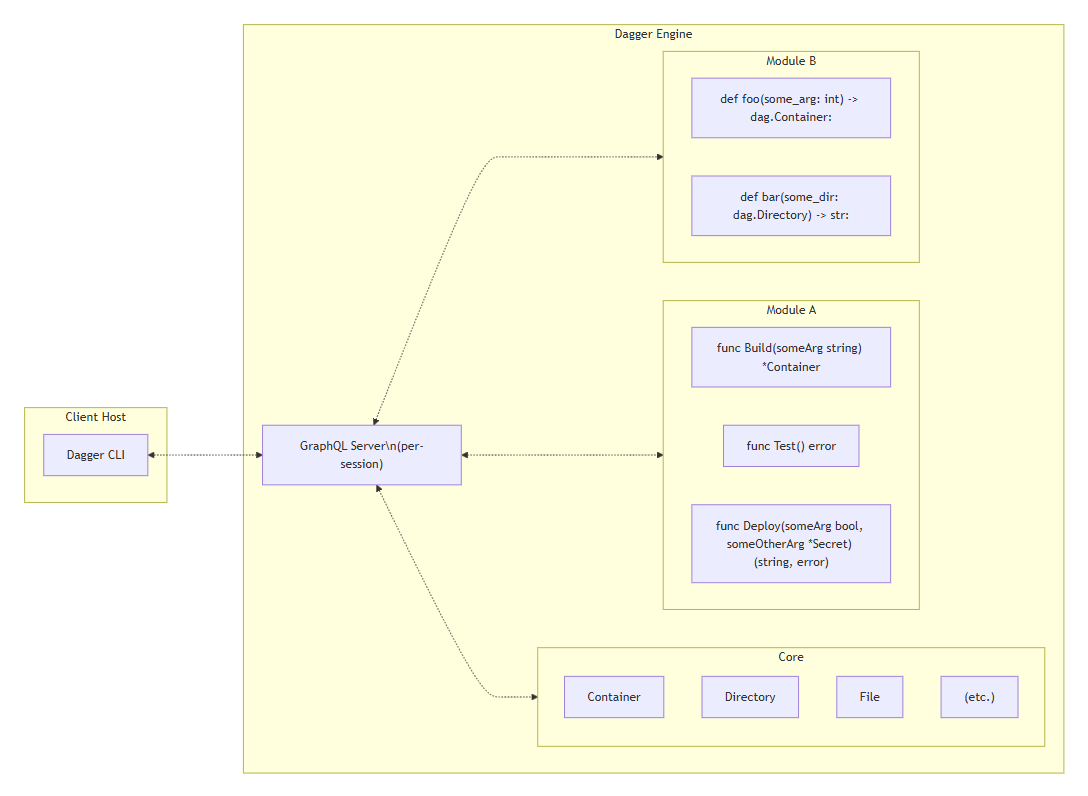
Internally, Dagger uses GraphQL as its low-level, language-agnostic API. However, you normally don’twrite GraphQL queries yourself. Instead, you use one of Dagger’s SDKs (Go, Python, TypeScript, etc.), which generate native bindings with:
- strong typing,
- IDE autocompletion,
- compile-time validation.
This is really one of Dagger’s biggest developer experience wins!
Another major feature provided by the Dagger API is caching. Dagger turns every call to the API into a DAG (Direct Acyclic Graph, hence the name DAGger!) of low-level operations.
When possible, each of these operations is cached in-memory, so that a workflow’s execution is much faster after its first run.
Workflows as code: functions, types, and modules
Before diving into the hands-on, we have to discuss some basic concepts that will help us take advantage of Dagger’s strengths.
Functions as the building blocks
In Dagger, a workflow is nothing more than a composition of functions, so it is crucial to understand what a Dagger Function is.
A Function, just like in most programming languages, is a piece of code that takes some input and produces some output, encapsulating a part of the application’s logic.
Dagger’s approach leans towards the functional programming paradigm, where programs are implemented by chaining function calls one after another.
When writing your Functions, you can access the Dagger API via the SDK. This allows you to make calls to the core Dagger API and to any other Dagger modules you depend on. But you can also rely on thelanguage's standard library and all third-party libraries you need!
Dagger’s type system
Dagger provides built-in types, such as:
- Container
- Directory
- File
- Service
- Env
- LLM
These types are an integral part of the API and work exactly like classes in an object-oriented language (e.g., Java). Dagger types:
- hold state,
- expose methods,
- can be passed between functions.
Users can easily create new types by writing classes in the chosen SDK language and decorating them with the @object_type annotation. Instance methods of the class with the @function annotation become Dagger Functions.
Modules: reuse without copy-paste
Custom functions and types can be packaged into Dagger modules. Modules can be:
- shared within a team,
- published publicly on Daggerverse,
- consumed directly from GitHub without local installation.
Dagger modules ensure code reusability, similarly to what composite actions and reusable workflowsprovide for GitHub Actions.
When you use a Dagger module in your workflow, you are essentially extending the Dagger API with the types and functions provided by the module.
How to call the Dagger API
Now that we know how Dagger works internally, let’s understand how to use it.
Dagger interactive shell
Assuming you have Dagger installed in your system (if you don’t, refer to this page for installation instructions), you can start the Dagger interactive shell by simply running dagger in the bash terminal:

The interactive shell reads your commands as Functions with input arguments. To run a pipeline, use the pipe (|) symbol to chain Function calls, like in this example from the official documentation:
container |
from cgr.dev/chainguard/wolfi-base |
with-exec apk add go |
with-directory /src https://github.com/golang/example#master |
with-workdir /src/hello |
with-exec -- go build -o hello . |
file ./hello |
export ./hello-from-dagger
Note that container is a Function name! To be precise, it is the constructor of the Container class, which allows to instantiate an object of type Container. The following calls are all to Functions(methods) provided by the Container class (from, with-exec, with-directory, ...).
Dagger CLI
As an alternative to the interactive shell, you can also invoke Dagger by using the dagger command in bash. This command produces exactly the same result as the one above:
dagger core container from --address="cgr.dev/chainguard/wolfi-base" \
with-exec --args="apk","add","go" \
with-directory --path="/src" --source="https://github.com/golang/example#master" \
with-workdir --path="/src/hello" \
with-exec --args="go","build","-o","hello","." \
file --path="./hello" \
export --path="./hello-from-dagger"
No matter how it is run, a client always opens a new session within the Dagger Engine. Each session is associated with its own GraphQL server instance, virtually sandboxing the execution environmentwhere the pipeline is run.
Dagger Cloud
Dagger Cloud is a web portal for organizations to check the logs and outcomes of their Dagger workflowruns.
To connect to Dagger Cloud from your local development environment, you need to run the dagger logincommand, and then follow the instructions.

To connect to Dagger Cloud from a CI environment, such as GitHub Actions, you must use a Dagger Cloud token. Dagger Cloud creates this token automatically when you sign up, so you just need to copy and save it as a secret in your CI environment, and then reference it in your workflows.
How to integrate Dagger with GitHub Actions
Now that we have covered the most important aspects of Dagger, let’s zoom back and see how it compares with GitHub Actions in some fundamental CI/CD features:
Feature | Dagger | GitHub Actions |
Execution environment | Container (Dagger Engine) | Virtual machine (GitHub Actions runner) |
Workflow definition | Imperative (general-purpose programming language) | Declarative (YAML) |
Execution model | Functional (chaining of functions) | Imperative (mainly bash scripts) |
Reusability | Modules | Custom actions and reusable workflows |
Caching support | Out of the box | Opt-in (specific custom action) |
At first sight, Dagger and GitHub Actions seem to be competitors in the same field. However, they are most effective at different things, and they work very well in synergy.
As a general rule of thumb, consider this decision tree when deciding whether to use Dagger or GitHub Actions:
Use Dagger when:
- Build and test logic needs to be reusable.
- High consistency between local and CI environments is important.
- Caching is a critical requirement.
- Infrastructure abstraction through containers is desired.
Use GitHub Actions when:
- Orchestration and event handling are required.
- Secrets management is needed.
- Tight repository integrations are important.
- Compliance and policy enforcement are key.
You can even go with a mixed approach, that combines the benefits of both. For example, by using GitHub Actions for orchestration and Dagger for execution:
- GitHub provides a comprehensive development ecosystem, bringing together source code, collaboration, project management, issue tracking, security and CI/CD.
- Dagger provides fast and reproducible workflows.
To showcase this approach, we will now try to integrate Dagger into the SDLC of a web applicationversioned in a GitHub repository.
Demo project: CI/CD for a web app
This demo applies the Dagger model to a simple application with two microservices:
- Vue frontend
- FastAPI backend
Here is the GitHub repository for the project: https://github.com/Liquid-Reply/dagger-demo.
These are the goals to achieve with Dagger:
- Developers must be able to test, build and publish both microservices' images to the GitHub registry from their local terminal (assuming Dagger is installed).
- When developers push code to the remote branches or they create a tag, a GitHub Actions workflow must get triggered to build and publish both images to the registry using the Daggermodule.
- Environment-specific configurations must be properly handled when building the frontend image.
Here is the location of the Dagger module that implements these requirements in the GitHub repo: https://github.com/Liquid-Reply/dagger-demo/tree/main/.dagger. You can read through the module’sREADME to find out how it works and how to use it.
Extra: support for agentic AI
As we discussed in the introduction, Dagger’s workflow execution model can be applied to many use cases, not only to CI/CD pipelines. Dagger enables agentic AI by providing specific types designed for working with LLMs in its core API.
This extension of the previous demo focuses on enabling an AI agent to push code changes requested by developers.
In particular, this is the scenario we want to implement: When a dev opens an issue in GitHub and labels it as "agent", a GitHub Actions workflow is triggered. This workflow in turn executes a Dagger workflow, which:
- Reads the issue and develops a feature/fix according to the issue's definition.
- Pushes the changes to GitHub and opens a Pull Request to merge them to the main branch.
The implementation uses the github-issue module. The code can be found here: dagger-demo/.dagger/src/dagger_workflow/agent.py at main · Liquid-Reply/dagger-demo.
Final takeaways
Dagger should not be used to replace your existing CI/CD platform. Instead, you should use it to replace the fragile script-based steps in your pipelines.
By unifying local and remote automation into a single, code-driven workflow, Dagger enables DevOpsteams to build pipelines that are faster, safer, and easier to understand, both for software release and for AI-powered development.