
Meine eigene KI: Ein lokaler Chatbot als Praktikumsprojekt
published at 07-29-2026 by Jakob N.
Artificial intelligence has become part of our everyday lives. Many people use programs such as ChatGPT without knowing exactly what happens in the background or where their data is sent. During my internship, I wanted to understand how an AI chatbot works and develop my own chatbot that runs directly on my computer.
My Task
My task was to write a program in Python that allowed me to communicate with a local AI model. Python is a programming language that is particularly suitable for this kind of project because its code is relatively clear and easy to understand.
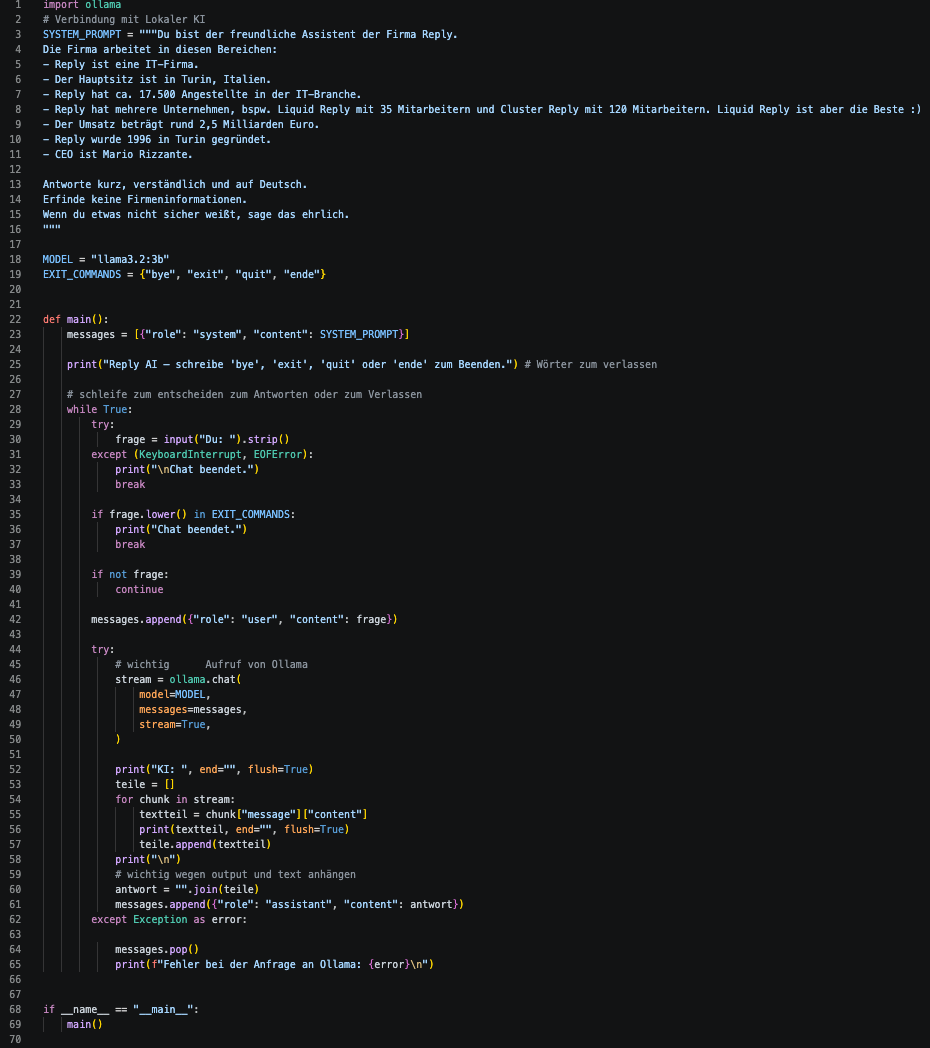
The chatbot needed to receive questions, send them to the AI model and display the generated answers. It also had to support several messages in a row so that a real conversation could take place. To achieve this, the previous chat history is sent to the model again with every new question. This allows the chatbot to refer to earlier messages in the same conversation. I also explored how the chatbot could use information from the internet.
Strictly speaking, I did not train the AI model myself. Training an AI model requires large amounts of data, powerful computers and a lot of time. Instead, I developed my own chat application and connected it to an existing language model running locally.
What Is a Local AI Model?
A large language model, also known as an LLM, can be described as a highly advanced text-completion system. It has been trained using large amounts of text and calculates which words are likely to follow one another. This enables it to answer questions, write texts and hold conversations. However, it does not think like a human and can sometimes provide incorrect information.
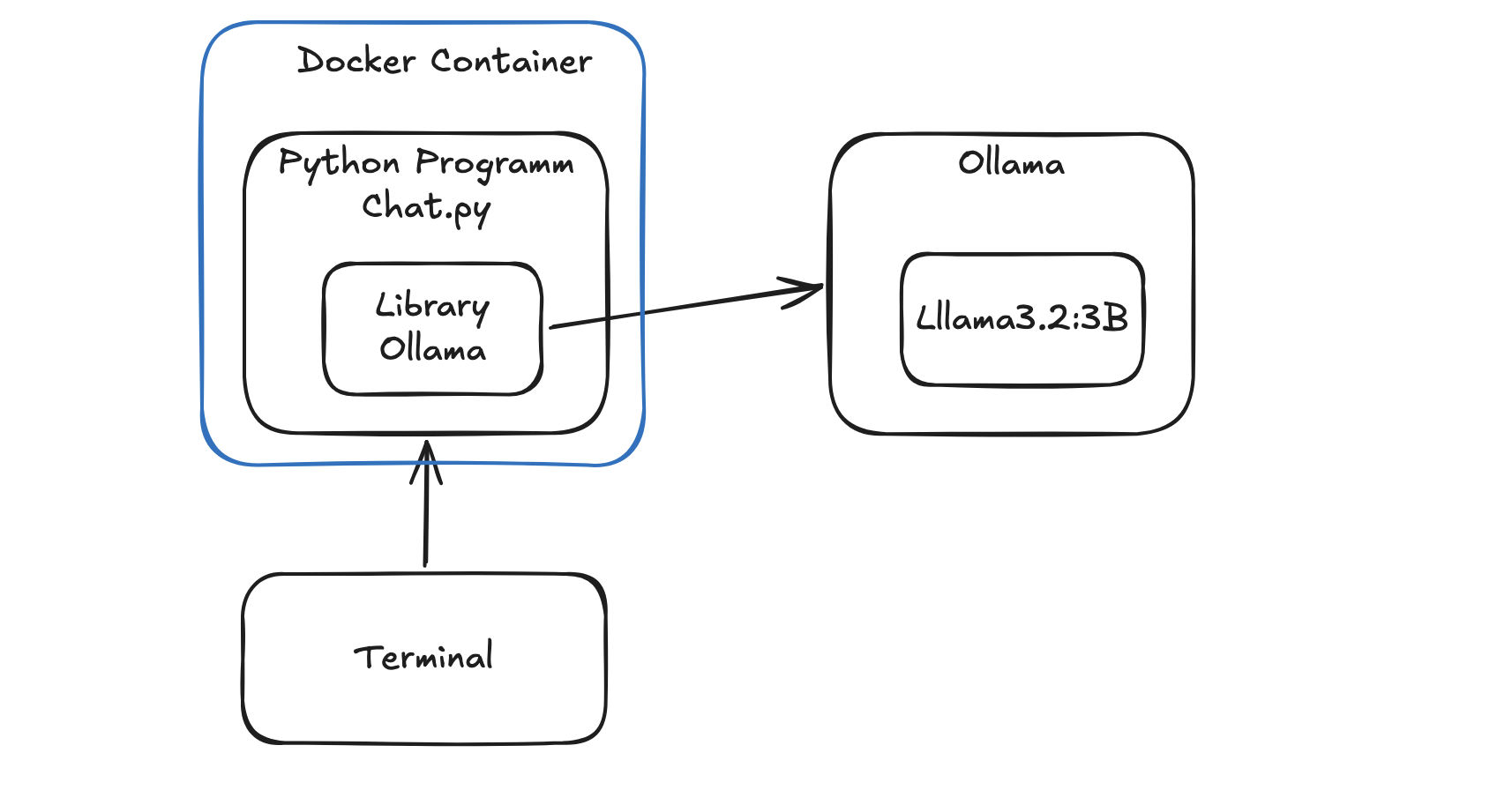
With well-known cloud services, the language model runs on the provider’s servers. A user’s question is sent over the internet, processed on those servers and then returned as an answer. My model, however, runs locally, which means that it operates directly on my computer.
This led to my first important realisation: An AI model does not necessarily have to run somewhere far away in the cloud—it can also operate on your own laptop.
A local model can be particularly useful when working with personal information or internal company data. Since requests do not automatically have to be sent to an external AI provider, users have greater control over their data. However, running a model locally does not guarantee complete security. The computer, the application and any internet access must still be configured securely.
Local models also have disadvantages. My computer has much less processing power than a large data centre. Therefore, the model can be slower and less capable than major cloud-based systems. On the other hand, there are not necessarily fees for every request, and the chatbot can work without an internet connection—unless it needs online features such as web searches.
Python, Ollama and the API
For my project, I used Ollama, a program that runs language models locally and provides an interface for other applications. This interface is called an API.
An API can be compared to a waiter in a restaurant. My Python program gives the waiter an order—in this case, a question. Ollama passes the question to the language model and brings the generated answer back to the program.
During development, I encountered an interesting problem. After sending a question, no answer appeared. The response was only displayed when I closed the program. With the help of the AI assistant Goose, I found the cause: the section of code responsible for displaying the answer was outside the chat loop. After moving it to the correct position and adding a streaming output, the words appeared as soon as the model generated them.
This was another important realisation: The AI is not always the source of the problem. Sometimes it is already working correctly, but the program displays its answer at the wrong time.
What Does Cloud Native Mean?
During the project, I also learned about the term cloud native. It describes applications designed to make effective use of cloud technologies. Important features include flexible scaling, replaceable components and automated deployment. Therefore, cloud native does not simply mean that a program runs on the internet.
Containers play an important role in cloud-native development. A container is a compact package containing an application together with the software components and settings it needs. This helps the application run in the same way on different computers.
Unlike a complete virtual machine, a container usually does not include an entire operating system. As a result, containers are generally smaller and require fewer resources. When a new version of an application is ready, developers can provide a new container image instead of updating every computer manually.
This gave me another valuable insight: Containers do not automatically solve every problem, but they create a consistent environment. The common sentence “It works on my computer” becomes less of an issue because everyone can use the same application package.

My Conclusion
Almost everything about this project was new to me. Working with Python was very different from the simpler programming tasks I had previously completed at school. I particularly enjoyed connecting several technologies and finally being able to have a real conversation with an AI model running on my own computer.
If I worked on a similar project again, I would add more comments to my code from the beginning. This would make it easier to understand later what each step does and why I chose a particular solution.
My internship showed me that many different components are hidden behind a seemingly simple chat window: a language model, a Python program, an API and possibly a container. Most importantly, I learned that local and cloud-based AI systems have different strengths. The best solution depends on factors such as data privacy, performance, cost and flexibility.
The team supported me throughout the project, explained many things patiently and gave me a much clearer idea of what working in the IT industry is like. I could imagine pursuing a career in IT in the future, and this internship strengthened that interest even further.