
Beyond the Model: The Hardware Decisions That Define Your AI Strategy
published at 03-11-2026 by Lino Deppe
Unlocking the black box: How does model size translate into real hardware requirements?
In this post we break down the fundamentals every tech professional should know:
► LLM sizes: overview of LLMs and their intended use ► Memory demand: how to estimate it quickly and reliably ► Hardware choices: CPUs vs GPUs vs TPUs ► The VRAM bottleneck: why memory is the central constraint for inference performance
This is your guide to the engine room of Generative AI.
Large Language Models are no longer just a fascinating technology; they are a foundational building block for the next wave of software innovation. We've all been amazed by their ability to write, reason, and create. But to move from being a user to a builder, we must look past the conversational interface and understand the engine underneath.
Why does a model with 70 billion parameters require high-end datacenter GPUs just to answer a simple question? How do you calculate the memory demand of an LLM and choose the right infrastructure? And what is the single biggest hardware bottleneck that determines the cost and performance of your entire application?
This article demystifies these core fundamentals. We will move from magic to mechanics, giving you the essential knowledge to make critical design decisions, understand the trade-offs, and choose the right infrastructure for powerful and efficient GenAI applications.
Content
What are LLMs?
How big are LLMs?
Memory demand for training and inference
Choosing the right infrastructure for training and inference
The VRAM Bottleneck: Why memory is the core challenge in LLM infrastructure
From Theory to Practice
1. What are LLMs?
Large language models (LLMs) are a category of deep learning models trained on immense amounts of data, making them capable of understanding and generating natural language and other types of content to perform a wide range of tasks. LLMs are built on a type of neural network architecture called a transformer which excels at handling sequences of words and capturing patterns in text.
LLMs work as giant statistical prediction machines that repeatedly predict the next word in a sequence. They learn patterns in their text and generate language that follows those patterns.
LLMs represent a major leap in how humans interact with technology because they are the first AI system that can handle unstructured human language on scale, allowing for natural communication with machines.
2. How big are LLMs?
An important characteristic of an LLM is its size. This refers to the number of parameters the model has and is usually specified in its name. For example, the model “Llama-2-13b-chat-hf” has a model size of 13 billion parameters (indicated by “13b”).
The size of an LLM, i.e., the number of parameters it contains, determines how complex the model is and how much data it can process. A larger model has more detailed knowledge and is usually trained in more areas. This provides users with satisfactory answers to more questions. Regardless of their size, all LLMs can understand, process, and respond to human language (known as natural language processing and NLP capabilities).
2.1 Overview of LLMs of different sizes and with different purposes
LLM name | Parameter count in billions (B) | Year | Summary |
|---|---|---|---|
Phi-3-mini | 3.8B | 2024 | Open Source/Open Model. Best when you need lowest cost/latency and potentially on-device scenarios; quality is strong for its size but will hit limits on harder reasoning. |
Phi-3-small | 7B | 2024 | Open Source/Open Model. Noticeably better quality than Phi-3-mini, still relatively efficient; often a good default for production if you can afford a bit more compute. |
Mistral 7B | 7B | 2023 | Apache 2.0 license, efficient attention choices and very fine tuning friendly. |
Llama 3 8B | 8B | 2024 | Widely adopted “workhorse” open model size, strong general performance. |
Phi-3-medium | 14B | 2024 | Open Source/Open Model. Better for more complex instructions and tougher general tasks, while still far smaller than “large” LLMs. |
Gemma 2 27B | 27B | 2024 | Mid/upper tier open-weight model: better quality than 7–9B while still feasible to fine-tune. |
Llama 3 70B | 70B | 2024 | Large open model option with a strong community footprint; used for high-quality chat/instruct and domain adaptation. |
DeepSeek R1 | 671B total, | 2025 | Mixture-of-Experts style; popular for high-capability reasoning at competitive cost where available. |
GPT 4 | Estimated | 2023 | Models of that size deliver higher overall quality, stronger reasoning/coding, and greater robustness across diverse, messy real‑world tasks, often with less task-specific tuning and much higher cost. |
As shown in the table, there are significant variations in the size of LLMs. In 2019, the number of parameters was small. For example, the LLM RoBERTa, released in 2019, has 340 million parameters. Starting in 2022, more LLMs with more than 60 billion parameters were produced (Llama 70B models, GPT4, GPT5, etc.). These are mostly designed for multiple/general purposes and represent a large knowledge base. However, due to their considerable size, fine-tuning is very time-consuming and unattractive. Model hosting is also very expensive. For this reason, in addition to very large LLMs, “small” LLMs, known as SLMs, are increasingly being produced.
2.2 Small Language Models (SLM)
Small Language Models (SLMs) are lightweight versions of traditional language models designed to operate efficiently on resource-constrained environments such as smartphones, embedded systems, or low-power computers. They typically range from 1 million to 10 billion parameters. The SLMs are significantly smaller, but they still retain core NLP capabilities like text generation, summarization, translation, and question-answering.
While the term "Small Language Model" (SLM) is widely used, some practitioners find it misleading, as models with a billion parameters are objectively large. An alternative, "small Large Language Model (sLLM)”, was proposed but is considered too convoluted. As a result, the community has largely adopted the "Small Language Model," with the understanding that the term "small" is used only in comparison to the much larger language models.
SLMs differ from conventional LLMs not only in their smaller size, but also in their design as a specialized and optimized language model. They should be used for a single task, a specific purpose, or a specific application. Fine-tuning is an integral part of the adaptation process. The pre-trained models provide all the necessary skills for communication in natural language and understanding prompts, while fine-tuning enables the SLM to acquire domain-specific understanding and/or task-specific capabilities. You will read more about fine-tuning in the last chapter (LLM Integration Patterns) of this article.
You may integrate multiple specialized SLMs into a more comprehensive application or platform to meet the requirements of complex use cases while ensuring high accuracy and reliability in a resource-efficient manner.
3. Memory demand for training and inference (including formula)
3.1 Introduction
If you want to host or fine-tune large language models yourself, it is essential to know the memory requirements of a model. The total memory requirement consists of the memory needed to load the model into the server's working memory and the additional memory needed for hosting for inference (also known as model serving) or fine-tuning. In fact, loading the model is often very demanding and severely limits the remaining available memory for training and inference or requires special servers/VMs with a lot of (video) memory.
The parameter count and the desired accuracy of the model play a decisive role in loading the model. The desired precision determines the data type used for each parameter:
Name | Type | Size | Summary |
|---|---|---|---|
FP32/float32 | 32-bit floating point number | 4 bytes per parameter | High precision, used for high quality or critical use cases |
BF16/bfloat16 | 16-bit floating point number | 2 bytes per parameter | Standard precision |
FP16/float16 | 16-bit floating point number | 2 bytes per parameter | Outdated, use BF16/bfloat16 instead |
INT8 | 8-bit integer | 1 byte per parameter | Quantization, memory-efficient, used when training can take longer or slightly lower accuracy is accepted |
INT4 | 4-bit integer | 0.5 bytes per parameter | Quantization, memory-efficient, used when training can take longer or lower accuracy is accepted |
Of these data types, BF16 is most used because it offers a good compromise between precision and memory requirements. BF16 was developed as an improved version of the FP16 data type by Google Brain (hence the “b”). FP32 offers the best precision but also requires the most memory. INT8 and INT4 are data types used in techniques such as quantization. In quantization, a model with parameters in BF16 is often loaded, and its parameters are then reduced to INT8 or INT4 using special algorithms, halving or quartering the memory requirements.
3.2 Calculating base memory demand
If you know a model parameter count and the desired numerical precision, you can calculate the memory required to load it. The chosen precision determines how much memory each parameter occupies. You can calculate the total required memory using the following formula:

Kindly note that the above formula applies to all ML models and that the number of parameters in the classical ML world is typically expressed in millions. For models that use parameters in the billions, the formula can be simplified:

Alternatively, instead of multiplying by 0.93, you can multiply by 1 (one), which allows you to perform an approximate calculation in your head.
Taking the “Llama-3-8B” model with a parameter data type of BF 16 as an example, the exact memory requirements for loading the model can be calculated as follows:

3.3 Inference memory demand
Inference (model serving) requires additional memory. For each request, memory corresponding to the size of the input token and the text generated so far must be available. Consequently, the amount of total available memory limits the maximum number of requests that can be processed simultaneously. When calculating memory requirements, it is recommended to use the simplified variant, which involves multiplying by one. This immediately provides a small buffer that can be used for incoming inference requests.
3.4 Training and fine-tuning memory demand
Calculating the storage requirements for training and fine-tuning is much more complicated and depends heavily on the algorithms and training settings used. In any case, it is significantly higher than for inference. As a rough guideline, you can assume four to six times the memory requirements of inference. For the “Llama-3-8B” model using the BF16 data type, that would be approximately 60 GB to 90 GB.
In terms of memory requirements, it does not matter whether training is carried out from scratch or as fine-tuning – in both cases, the memory requirements are identical. The usually smaller amount of training data required for fine-tuning compared to training from scratch only affects the duration and utilization of the GPU; memory requirements are not affected. Only with memory-optimized algorithms such as parameter-efficient fine-tuning (abbreviated: PEFT) and (quantized) low-rank adaptation (abbreviated: LoRA and QLoRA) is the memory requirement significantly reduced.
4. Choosing the right hardware for training and inference
For training and inference of LLMs, you must decide which hardware to choose. For this, special resource constraints must be considered: algorithms and technologies/tools used in training and inference. They determine what type of hardware can and should be acquired. For example, GPU-based algorithms cannot usually be run on CPUs. And although commonly integrated tools/technologies, such as vLLM in inference, often support a variety of hardware (CPUs, GPUs, TPUs, etc.) they have much better performance when using hardware other than CPUs.
4.1 CPUs vs GPUs/TPUs
In general, CPU-based machine learning algorithms cannot process large amounts of data within a reasonable time frame. These are usually optimized for effectiveness, i.e., maximizing their suitability for solving a specific problem or performing a task, rather than focusing on efficiency (e.g., time to result). In comparison, GPU/TPU-based algorithms offer an attractive alternative. They offer a high degree of parallelizability (more tasks and requests can be processed simultaneously), higher throughput, faster data processing, and the peak performance is significantly higher than that of CPUs of the same modern design.
4.2 GPUs vs TPUs
Specialized Performance
Tensor Processing Units (TPUs) are specifically designed for neural networks computations. They excel at the massive matrix and tensor operations that are the foundation of LLMs, often resulting in faster training times and higher inference throughput for compatible models. The specialized nature of TPUs is also their main drawback.
Graphics Processing Units (GPUs) are more general-purpose processors. They can efficiently handle a wider variety of computational tasks beyond just matrix math, including data preprocessing and other custom operations that might be part of a complex model's architecture. Workloads that are not dominated by dense matrix multiplication may not see a performance benefit on TPUs and could even run slower.
Ecosystem and Support
The GPU ecosystem, primarily driven by NVIDIA's CUDA platform, is far more mature and universally adopted. Almost all machine learning frameworks (like PyTorch, TensorFlow, JAX) have native, well-supported GPU integration. In contrast, TPUs require code to be compiled using the XLA (Accelerated Linear Algebra) compiler. This necessitates code changes when switching between GPUs and TPUs and limits flexibility.
Availability
GPUs are widely available from all major cloud providers (including European (sovereign) cloud providers) and can be purchased for on-premises data centers. TPUs, on the other hand, are primarily available only on Google Cloud Platform (GCP).
4.3 Other Processing Units
Beyond the primary datacenter processors mentioned so far, two other categories of hardware warrant discussion: NPUs and proprietary AI accelerators.
Neural Processing Units (NPUs) are processors designed specifically for efficient neural network computation in low-power environments. Commonly found in consumer edge devices like smartphones, laptops, and IoT hardware, their primary advantages are power efficiency and the ability to perform on-device processing. This enables offline functionality and enhances user privacy by keeping data local. However, their design is not suited for the demands of high-performance LLM training or large-scale inference, and they are not offered as a datacenter resource.
Then there are proprietary cloud AI accelerators. These are custom-designed AI chips developed by major cloud providers to optimize specific workloads. Prominent examples include AWS Inferentia, Intel Gaudi and the already presented Google TPUs. Their main goal is to provide superior price-performance for a specialized task. Since these chips have their own hardware architecture, they require the use of a specific Software Development Kit (SDK). This necessitates code changes, adds implementation overhead and overall increases your vendor lock-in greatly.
4.4 What we would choose
For the vast majority of LLM use cases, GPUs are the definitive choice. They remain the most versatile and reliable option, with a mature ecosystem, unmatched flexibility, and excellent performance that establish them as the industry's gold standard for both training and inference.
Proprietary AI chips from cloud vendors present a compelling trade-off: sacrificing flexibility for superior price-performance on specific tasks. While Google TPUs are engineered for massive-scale training and AWS Inferentia for high-throughput, low-cost inference, this specialization comes at a cost: significant vendor lock-in and limited availability, particularly on sovereign cloud platforms.
CPUs occupy a niche role, best reserved for latency-insensitive, asynchronous applications where immediate response times are not a concern and cost is the primary driver.
5. The VRAM Bottleneck: Why memory is the core challenge in LLM infrastructure
5.1 Limited VRAM capacity in infrastructure offerings
When searching for suitable GPUs offered by cloud providers, you will quickly encounter a significant limitation: the size of the available video memory (VRAM). Important context: GPU cloud instances or VMs usually have a large amount of regular RAM combined with CPUs and only a small portion is the actual GPU with the included VRAM. Only the smaller VRAM portion (which is often difficult to find on the provider's website) is suitable for the high-performance processing of LLM tasks. CPUs and regular RAM perform a key supporting role: it preprocesses and loads constantly fresh batches of data into the GPU, acts as overflow buffer when using special algorithms, and runs all other necessary tasks of the cloud instance/VM like the operating system. Nevertheless, VRAM capacity, which is often difficult to find, should be your main concern when choosing a GPU.
Even in professional data center GPUs, video memory is small compared to CPU-based servers. For example, the Nvidia A100 GPU, often listed in benchmarks and released in 2020, has a variant with 40 GB VRAM and a variant with 80 GB VRAM. The Nvidia H200 GPU released in 2024 offers a maximum of 141 GB VRAM. This is more than the A100 variant, but not enough to run large models such as GPT-3-175B or Falcon 180B on a single GPU without potential accuracy losses. Only the newest Nvidia B200 datacenter GPU with 192 GB of VRAM would be able to fulfil the memory requirements without reducing precision but at extreme costs. However, constantly evolving techniques such as quantization can be used to greatly reduce the memory requirements for training and inference at the expense of slightly lower precision, thereby making more efficient use of available resources. You can also use a technique called model parallelism (or tensor parallelism), to shard or split a model over multiple GPUs, but this comes with a slight overall performance loss and network overhead.
LLM name | Parameter count in billions (B) | BF16 | INT8 | INT4 |
|---|---|---|---|---|
Phi-3-mini | 3.8B | ~7.08 GB | 3.54 GB | ~1.77 GB |
Phi-3-small, Mistral 7B | 7B | ~13.04 GB | 6.52 GB | ~3.26 GB |
Llama 3 8B | 8B | ~14.90 GB | ~7.45 GB | ~3,73 GB |
Phi-3-medium | 14B | ~26.08 GB | ~13.04 GB | ~6.52 GB |
Gemma 2 27B | 27B | ~50.30 GB | ~25.15 GB | ~12.57 GB |
Qwen3-32B | 32B | ~56.60 GB | ~29.80 GB | ~14.90 GB |
Llama 3 70B | 70B | ~130.39 GB | ~65.19 GB | ~32.60 GB |
The table shows the minimum VRAM capacity required for standard precision (BF16) and when using quantization (INT8/INT4). The requirements for training and inference are added on top of this. When selecting a model, also pay attention to the most common VRAM sizes of data center GPUs: 24 GB (budget-oriented), 40 or 48 GB (general purpose), 80 GB (new standard for training) and high-end GPUs (128 GB, 141 GB, 192 GB).
5.2 The VRAM bottleneck explained
To use a GPU for LLM tasks, it is essential that all data required to perform a process or task is available in the GPU's main video memory. The high number of parameters in LLMs means that a large portion of the available video memory is used solely for loading the model. For example, Microsoft’s Phi-3-medium open model with 14 billion parameters using a 16-bit data type takes up approximately 26 GB of VRAM to load (see formula described in previous sections). Memory requirements for fine-tuning or processing requests/prompts during inference are added on top of this.
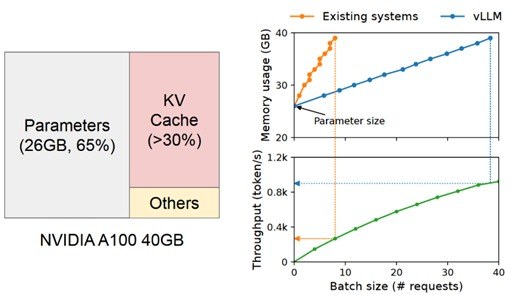
Left: Memory demand for loading the 14B Phi-3-medium model with standard precision into GPU.
Right: Request batching (implemented with vLLM) to use VRAM more efficient.
Even with the use of memory optimization for inference techniques like request batching, KV-batching and paged attention, the remaining video memory of a GPU after loading a single model is very limited. In practice, only a fraction of the GPU's available computing power is used in inference, making the size of the video memory a limiting factor in inference (memory-bound). Hitting the upper limit of the VRAM is responsible for a large part of latency.
For this reason, when selecting GPUs for inference of LLMs, the size of the video memory should always be prioritized over the computing power of the GPU. Only for pre-training or fine-tuning a LLM the computing power really matters. But don't forget that in this cases, VRAM requirements are much higher than for inference when memory-efficient fine-tuning algorithms such as PEFT, LoRA and QLoRA are not used.
You should also carefully consider (or conduct an experiment to determine) whether you really need the current size of the model or whether a smaller or quantized LLM would still be sufficient for your use case.
6. From Theory to Practice
The decision to leverage a Large Language Model is only the first step. As we've detailed, the most critical choices that follow are not merely technical - they are economic and strategic.
Understanding how a model's parameter count translates into gigabytes of VRAM is not just an engineering exercise; it is the foundation of your budget and the key to your application's performance. The trade-offs between a general-purpose GPU and a specialized cloud accelerator are strategic decisions about vendor lock-in, scalability, and long-term operational cost.
So, how do you translate these fundamentals into a competitive advantage?
This is precisely the challenge we solve. For years, Liquid Reply has specialized in building robust, scalable Internal Developer Platforms (IDPs) on Kubernetes to master complex infrastructure. We now apply this deep expertise to the next frontier: helping organizations build sovereign, production-grade AI and LLMOps platforms.
The engineering challenges are analogous—managing complex pipelines, optimizing scarce GPU resources, and providing seamless developer experience. Our reference architecture, built on the power of Kubernetes, gives you control over your models, your data, and your costs.
Stay tuned as we publish more articles on LLMOps, showcasing practical implementations of model serving, monitoring, and automated fine-tuning pipelines.
To accelerate your journey from concept to production, contact us to discuss how we can build your AI platform together.